

Over the past 10-15 years, e-commerce has been one of the fastest-developing sectors of the trade business. That may seem clear to anyone who has ever shopped online, but the size and speed of the boom have been truly surprising. There are already thousands of online stores around the Web, and according to some appraisals, wholesalers open 20,000 new e-commerce storefronts every week. Because the use of mobile phones to access websites is constantly increasing day by day, and e-commerce sales are a large portion of this traffic.
The fame of the online market shows no signs of slowing, so now may be the perfect time to start selling on the web. There are more options for creating an e-commerce site than ever before. You can work with an e-commerce platform provider to set up an online store, or you may want to let web professionals handle the design and development of your site from start to finish.
We all know development is a complex part of the website. In any project, there are many factors to consider, from user experience to performance. Development of any enterprise website is a large-scale, complex process, but e-commerce sites have their own many more challenges. Since users will be coming to the site to learn about and purchase products, developers will want to do everything they can to make this course easy and native.
Note – Things to Remember before Creating your website:
- Create your business plan
- What are you selling?
- Choose an e-commerce Platform
- Focus on your targeted market.
- How much money do you want to invest in your E-commerce
In this guide, you’ll learn about what goes into building your own do-it-yourself (DIY) e-commerce website, by selecting the right tools and services you’ll need to make your website, to choosing the best e-commerce platform and payment gateway to fit your business, and also figuring out the best security for your site.
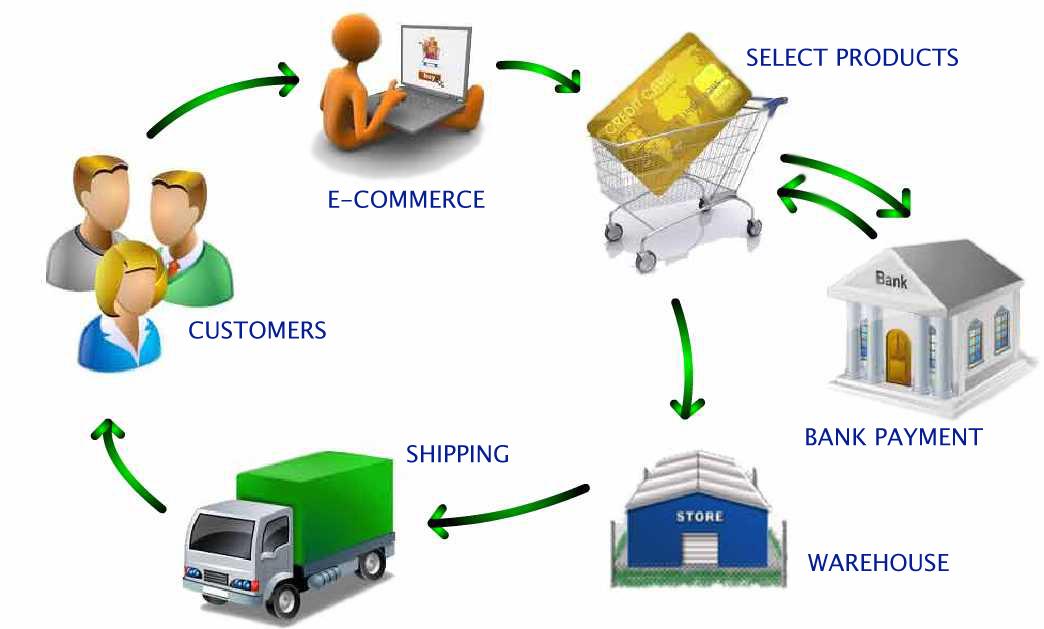
Choosing your best Web Design Tool:-
After creating a business plan now ready to focus on your new step, it’s time to start creating your e-commerce website. The first step is choosing the tools you want to use for design and code your website. You have to learn some technology like “HTML, PHP, ASP, and CSS”; you don’t need to be proficient in any of them to create a website on your own; you should at least familiarize yourself with these technologies. There is an inclusive range of resources available at Website.
Select Your Best Platform for E-commerce
When you are going to an online store, there are lots of things to keep in mind, such as one of the most important factors, which platform is best for an e-commerce website.
I work for an internet marketing company, “Joomdev,” and we do a lot of e-commerce work for our clients. We often work on Joomla.
There are two main types of e-commerce platforms: hosted and self-hosted. Hosted means the company will host your store, while self-hosted means they will provide you with software, but you have to get your own Web hosting.
Joomla: –
Joomla is a free and open-source content management system (CMS) for publishing web content. In Joomla, you can create any type of website.
Advantages of using Joomla in an e-commerce business
1. We can create an e-commerce website without investing a single penny.
2. There is a wide range of free extensions that are available easily, which make an e-commerce website robust and easy to navigate.
3. There is a large no. of online communities available that can assist a developer in case of any issue.
4. Those people who shop over the Internet or prefer e-commerce portals have effective features like an effective shopping cart and Joomla enhances the productivity and implementation of a shopping cart, which makes the portal easy to operate for the both front end user and admin as well.
5. The standard for Joomla is VirtueMart. Virtuemart is a little e-commerce solution that deals with many of the usual features for product management, shipping, payment gateways such as PayPal and Google Checkout, and even downloadable products like eBooks. It’s fairly flexible and very easy to use.
Shopify:
Shopify is also one of the most powerful e-commerce website solutions that allows you to sell online by providing everything you need to create an online store.
Benefits of Using Shopify
- User-Friendly and Intuitive Admin Dashboard
Shopify offers a clean, modern, and easy-to-navigate admin panel, making store management simple for both beginners and experienced users. - Customizable Checkout Experience
Businesses can optimize and customize the checkout process to improve conversions and provide a seamless shopping experience. - Efficient Inventory Management
Shopify makes it easy to manage, track, and update large and constantly changing product inventories in real time. - Modern and Professional Store Designs
Shopify provides a wide range of contemporary, mobile-responsive themes that help businesses create visually appealing online stores. - Reliable Customer Support
Access to dedicated customer support and extensive documentation ensures quick resolution of issues and smooth store operations. - Cost-Effective Pricing Plans
Shopify offers flexible and affordable plans suitable for startups, growing businesses, and established brands. - High-Performance Themes and User Experience
Shopify themes are optimized for speed, responsiveness, and conversions, helping businesses deliver an excellent shopping experience across all devices. - Scalability for Business Growth
Whether you’re launching a new store or managing thousands of products, Shopify scales effortlessly as your business grows. - Extensive App Ecosystem
Thousands of apps and integrations allow businesses to add marketing, SEO, automation, CRM, and analytics capabilities without complex development. - Built-In Security and Reliability
Shopify handles hosting, security updates, SSL certificates, and PCI compliance, ensuring a secure shopping environment for customers. - SEO and Marketing Friendly
Built-in SEO features, blogging capabilities, email marketing integrations, and social commerce tools help businesses attract and convert more customers. With proper Shopify SEO optimization, businesses can increase search visibility, attract qualified traffic, and generate more online sales. - Multi-Channel Selling
Sell products across your website, social media platforms, marketplaces, and point-of-sale systems from a single dashboard. - Fast and Reliable Hosting
Shopify’s cloud infrastructure ensures excellent uptime, fast page loading speeds, and a smooth shopping experience. - Mobile Commerce Ready
All Shopify stores are mobile-optimized, helping businesses capture sales from smartphone and tablet users. - Global Selling Capabilities
Support for multiple currencies, languages, and international payment gateways makes it easier to expand into global markets.
There are also some more Hosted and self-hosted e-commerce platform options available, like BigCommerce, Volution, Magento, woo commerce.
Note – Before selecting a hosting service provider for your website anywhere, don’t forget to Register Your Domain Name, you’ll need a domain name. Select something that your customers will find easy to remember.
Picking a Payment Solution
After selecting where you’ll set up shop on the web, the next step is selecting a way to take payments on your site. The payment process is what puts the “commerce” in “e-commerce.” Payment system categories are divided into two parts you have to consider for your website, i.e., the payment processor and a payment gateway.
Payment processors, like PayPal Website Payments Standard and Google Checkout, provide a checkout page that is hosted by the processing company. After customers submit their credit card information, they will be sent back to your website. Similarly, payment gateways—such as Authorize.net—integrate directly with your shopping cart, and the transaction is essentially invisible to your customer.
Before selecting a payment processor or gateway, you should have considered about a transaction, setup, and service fees that each provider charges.
When set up costs and fees, there are a few more things that you should think about before making a decision. Check to see whether the payment services provider you’re interested in offers automatic tax calculations. This will make it much easier to figure out how much sales tax you should be saving and will relieve your headaches during tax season. Also, be sure to find out if the processor or gateway you want to use can automatically calculate shipping charges. With this kind of service, you’ll know exactly how much to charge your customers so shipping costs won’t bother into your bottom line.
Pick out a Shopping Cart—or Building Your Own
An e-commerce shopping cart is the heartbeat of any online retail site. When shopping for a shopping cart, it’s important to pick out one that can be personalized to match your business and be flexible enough to grow with your business.
Here are some highlighted shopping card alternatives available for anyone who is investing in e-commerce. Like 3D Cart, Agora Cart, Zen Cart and many more. When selecting shopping cart to go with your payment processing solution, make sure it’s hosted by your hosting provider.
Security:
A wonderful site design and smooth integration with a payment system are great, but they are worthless if you and your customers aren’t protected from fraud and theft. Security is one of the major concerns that customers have when it comes to buying online.
But don’t worry about it, SSL security maintains your website. With an SSL certificate, you’ll be able to avoid cyber criminals from interrupting financial data as it’s transmitted over the internet. Not only that, but you’ll also be able to show your customers that your business is authentic and can be trusted.
What is an SSL Certificate?
An SSL (Secure Sockets Layer) certificate is a small data files that authenticate the identity of a website and encrypts information sent to the server using SSL technology. Encryption is the process of scrambling data into an undecipherable format that can only be returned to a readable format with the proper decryption key.
A certificate serves as an electronic “passport” that establishes an online entity’s credentials when doing business on the Web. When an Internet user attempts to send confidential information to a Web server, the user’s browser accesses the server’s digital certificate and establishes a secure connection.
1. An SSL certificate contains the following information:
2. The certificate holder’s name
3. The certificate’s serial number and expiration date
4. A copy of the certificate holder’s public key
5. The digital signature of the certificate-issuing authority
Types of SSL Certificate
There are some types of SSL Certificates (also known as Secure Certificates) that you can choose from.
Domain Validated Certificates
Company Validated Certificates
Extended Validation Certificates
Choosing the Right SSL Provider:
Here is a quick list of factors you need to think about before choosing an SSL Certificate Provider that best fits your requirements:
Check out the first SSL provider that has a valid EV SSL Certificate itself.
Make sure the SSL provider provides Customer Support, as well as has a valid mailing Address
Make sure that the SSL provider focuses only on SSL and offers multiple SSl Brands.
Make sure that the SSL Provider has an auto-SSL renewal system.
Make sure that the SSL provider offers SSL tools to confirm SSL installation.
Where to buy an SSL Certificate?
There are lots of SSL certificate providers available in the market, but I suggest you use SSL2BUY to buy an SSL certificate for your website.SSL2BUY is an authorized reseller of leading certificate authorities like GeoTrust, Comodo, Thawte, AlphaSSL, RapidSSL, GlobalSign, and Symantec.
They claim to provide the cheapest same-value certificates compared to certificate authorities. All certificates from SSL2BUY support up to 256-bit encryption with more than 99% browser recognition, and you will get some additional advantages like free 24*7 tech and installation support, fast issuance times, and no additional charge for certificate reissues.
Conclusion:-
These major steps will help you to create your first E-Commerce Website. It’s not an easy process to complete, start to finish. Even proficient web designers struggle when sitting down to create a new E-Commerce Website/store. But once you’ve gone through this a few times, things seem a lot more efficient and will flow more easily.
In addition, if you have tips or strategies for launching an online store, please share those in the comment section.
